Skripts Windows domēna lietotāju profilu dzēšanai
Publicēšanas datums: Jun 1, 2024
Atjaunināšanas datums: Jul 10, 2024

Jo vairāk un vairāk domēna lietotāju pierakstās konkrētā ierīcē, jo pārblīvētāks kļūst disks. Iespējams kādā brīdī jauni lietotāji vairs nevarēs pierakstīties, jo cietajā diskā vienkārši nebūs brīvas vietas.
Ja jūs vienkārši dzēsīsiet domēna lietotāja mapi no C:\Users, lietotājs nekad nevarēs pierakstīties savā profilā konkrētajā ierīcē – viņš tiks pierakstīts pagaidu lietotāja kontā.
Tāpēc pareizais veids, kā no Windows 10/11 ierīces dzēst domēna lietotāja profilu, ir doties uz Iestatījumi > Sistēma > Par sistēmu > Par > Uzlabotie sistēmas iestatījumi > Uzlabotie > Lietotāju profili un pēc tam vienu pēc otra dzēst lietotāja profilus.
Ja jums ir tūkstošiem lietotāju profilu, nav ļoti ērti tos noņemt pa vienam, tāpēc es sastādīju PowerShell skriptu, lai risinātu šo problēmu.
Šis ir pārskatīts raksts, jo sākotnēji skripts nedarbojās, kā vēlams, tagad tas pārbauda pierakstīšanās laikus, sūtot vaicājumu domēna kontrollerim.
# Main variables
$DaysSinceLastLogonThreshold = 180 # Number of days since last logon
$ExcludedProfiles = "*Windows*", "*default*", "*Public*", "*Admin", "Administrator" # Profiles that are excluded from the query

# Query to check if RSAT: Active Directory Domain Services and Lightweight Directory Tools are installed
$rsatCapability = Get-WindowsCapability -Online | Where-Object {$_.Name -like "Rsat.ActiveDirectory.DS-LDS.Tools*"}

# Check the State property and install if not installed already
if ($rsatCapability.State -eq "Installed") {
    Write-Output "Identifying user profiles that have been inactive for $DaysSinceLastLogonThreshold days"
} else {
    Write-Output "RSAT: Active Directory Domain Services and Lightweight Directory Tools are not installed. Installing now..."
    Add-WindowsCapability -Online -Name Rsat.ActiveDirectory.DS-LDS.Tools~~~~0.0.1.0
    Write-Output "Installation complete."
	Write-Output "Identifying user profiles that have been inactive for $DaysSinceLastLogonThreshold days"
}

try {
    # Get local user profiles
    $LocalProfiles = Get-WmiObject -Class Win32_UserProfile | Where-Object { $_.Special -eq $false }

    Write-Output "Total user profiles found: $($LocalProfiles.Count)"

    # Initialize an array to store removed user profiles
    $RemovedProfiles = @()

    # Initialize an array to store profile details
    $ProfileDetails = @()

    # Iterate through each local user profile
    foreach ($profile in $LocalProfiles) {
        $Username = $profile.LocalPath.Split('\')[-1]

        # Check if the profile should be excluded
        if ($ExcludedProfiles -notcontains $Username) {
            # Query Active Directory for the user's last logon date
            $User = Get-ADUser -Filter { SamAccountName -eq $Username } -Properties LastLogonDate -ErrorAction SilentlyContinue

            if ($User -ne $null) {
                $LastLogon = $User.LastLogonDate

                if ($LastLogon -ne $null) {
                    $DaysSinceLastLogon = (New-TimeSpan -Start $LastLogon -End (Get-Date)).Days
                    if ($DaysSinceLastLogon -ge $DaysSinceLastLogonThreshold) {
                        $profilePath = $profile.LocalPath
                        $RemovedProfiles += $profilePath
                        $ProfileDetails += [PSCustomObject]@{
                            Username = $Username
                            LastLogon = $LastLogon
                        }
                    }
                }
            }
        }
    }

    # Display the count of inactive user profiles
    Write-Output "Inactive user profiles: $($ProfileDetails.Count)"
    # Display identified inactive profiles
    if ($ProfileDetails) {
        $ProfileDetails | Format-Table -AutoSize

        # Prompt to delete all identified profiles
        $confirmation = Read-Host "Do you want to delete all identified inactive profiles? (Y/N)"
        if ($confirmation -eq "Y" -or $confirmation -eq "y") {
            foreach ($profilePath in $RemovedProfiles) {
                $profileToRemove = Get-CimInstance -Class Win32_UserProfile | Where-Object { $_.LocalPath -eq $profilePath }
                $profileToRemove | Remove-CimInstance -WhatIf # Remove -WhatIf to perform actual user removal.
            }
            Write-Output "All identified inactive profiles have been deleted."
            Exit 1
        } else {
            Write-Output "No profiles were deleted."
            Exit 0
        }
    } else {
        Write-Output "No inactive profiles were found."
        Exit 0
    }
} catch {
    Write-Error $_
}
Ko šis skripts dara:
- Tajā ir divi mainīgie, viens no tiem ir paredzēts neaktivitātes dienu iestatīšanai, bet otrs – profilu nosaukumu, kas jāizslēdz no vaicājuma, iestatīšanai.
- Tas pārbauda, vai RSAT Active Directory Domain Services un Lightweight Directory Tools ir instalēti, ja nav, tas turpina šīs pakotnes instalēšanu. Šī pakotne ir nepieciešama, lai varētu veikt vaicājumu domēna kontrollerim.
- Tas veic vaicājumu domēna kontrollerim, pārbaudot lietotāju profilu, kas atrodas konkrētajā datorā, pēdējos pierakstīšanās laikus;
- Tas parāda sarakstu ar visiem lietotāju profiliem, kas atbilst noteiktajam laika periodam, to pēdējās pieteikšanās laiku un aicinājumu dzēst profilus;
- Skripts piedāvā sausās palaišanas funkciju testēšanas vajadzībām. Lai reāli dzēstu lietotāja profilus, noņemiet argumentu “-WhatIf” no 68.rindiņas.
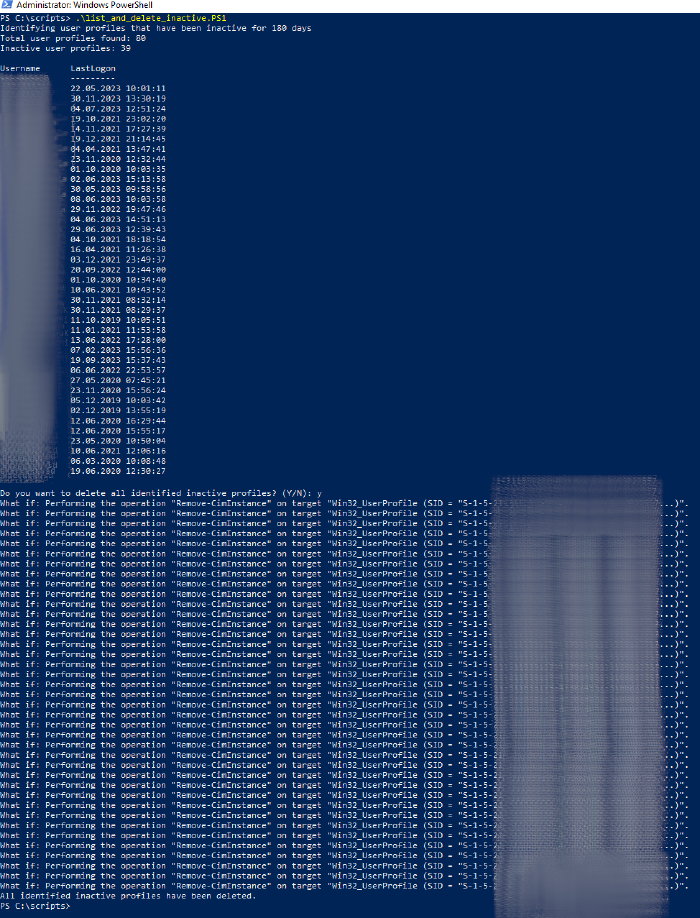 Skripts parāda visu lietotāju profilus, kas konkrētajā iekārtā nav pierakstījušies vismaz 180 dienas un piedāvā tos dzēst
Iespējot skriptu palaišanu pašreizējam lietotājam
Set-ExecutionPolicy -ExecutionPolicy Unrestricted -Scope CurrentUser
Update: Vienkārši noņemt visus Windows domēna lietotāju profilus, izņemot tos, kas definēti izslēgšanas sarakstā
Šajā gadījumā nav nepieciešams instalēt RSAT pakotni. Tāpat kā iepriekš minētais skripts, arī šis ir iestatīts ar sausās palaišanas funkcionalitāti (arguments “-WhatIf”).
# Excluded profiles
$ExcludedProfiles = "*Windows*", "*default*", "*Public*", "*Admin*", "tech"

try {
    # Get all User profile folders
    $UserProfiles = Get-ChildItem "C:\Users" | Where-Object {
        $excluded = $false
        foreach ($exclude in $ExcludedProfiles) {
            if ($_.Name -like $exclude) {
                $excluded = $true
                break
            }
        }
        -not $excluded
    }

    # Filter the list of folders to only include those that are not associated with local user accounts
    $NonLocalProfiles = $UserProfiles | Where-Object { $_.Name -notin $(Get-LocalUser).Name }

    # Initialize an empty array to store profiles to be removed
    $ProfilesToRemove = @()

    # Add profiles to be removed to the list
    foreach ($profile in $NonLocalProfiles) {
        $ProfilesToRemove += $profile.FullName
    }

    if ($ProfilesToRemove.Count -gt 0) {
        Write-Output "Profiles marked for deletion:"
        $ProfilesToRemove | ForEach-Object { Write-Output $_ }

        # Prompt to delete all identified profiles
        $confirmation = Read-Host "Do you want to delete all identified profiles? (Y/N)"
        if ($confirmation -eq "Y" -or $confirmation -eq "y") {
            foreach ($profilePath in $ProfilesToRemove) {
                try {
                    # Remove the profile
                    $profileToRemove = Get-CimInstance -Class Win32_UserProfile | Where-Object { $_.LocalPath -eq $profilePath }
                    $profileToRemove | Remove-CimInstance -ErrorAction Stop -WhatIf # Remove -WhatIf to perform actual user removal.
                } catch {
                    Write-Warning "Could not remove profile at ${profilePath}: $($_.Exception.Message)"
                }
            }
            Write-Output "All identified profiles have been processed."
        } else {
            Write-Output "No profiles were deleted."
        }
    } else {
        Write-Output "No profiles to be removed."
    }
} catch {
    Write-Error $_
}
Tavas domas?