

The Unbelievable Scope of Info-Stealing Malware

Info-stealing malware, or infostealers for short, is malicious software designed to steal sensitive data from your device. Apart from sending comprehensive logfiles that contain user information, passwords, autofill data, and cookies back to the attacker, it can also exfiltrate files and function as ransomware – encrypting users’ files and demanding a ransom payment for decryption.
Who is at risk?
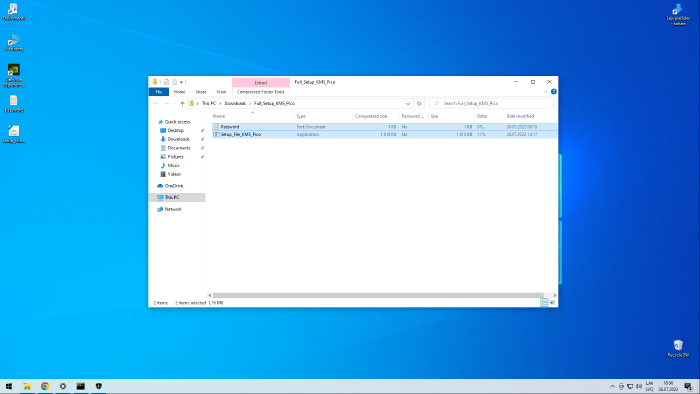
Mainly people who use Windows, especially those with pirated copies, and who tend to install free software from the Internet. Basically, any free software downloaded from a source other than a reputable vendor has the potential to be infected with malware.
The modus operandi of cybercriminals: The Big Fish and The Little Fish
The Big Fish are cybercriminals who develop infostealers and offer them, or their log files, as a service to the Little Fish. They are highly sophisticated and technically literate, capable of creating malware that evades antivirus detection. They operate Telegram channels, like the one shown in the screenshot below, providing paid access to infostealer logs or the malware itself.

Looking at the infostealer logs
In order to attract customers, the Big Fish provide free infostealer logs, luring in the Little Fish to eventually pay for access to private logs that may contain juicier information. The amount of free infostealer logs circulating on the darker side of the Internet is insane. After spending just an hour exploring various public Telegram channels, I managed to gather 60 gigabytes of these infostealer log files – all from the past day and all in plain sight. So, you can just imagine the pwnage going on behind closed doors.
The structure of infostealer logs
Below you can see the common structure that most of these logfiles share:
- Root Directory
- Autofill
- Firefox_sxunuso6.dev-edition-default-171.txt
- Cookies
- Discord_Default.txt
- Edge_Default.txt
- Firefox_sxunuso6.dev-edition-default-171.txt
- NVIDIA_CefCache.txt
- Steam_htmlcache.txt
- Downloads
- Edge_Default.txt
- Firefox_sxunuso6.dev-edition-default-171.txt
- GoogleAccounts
- Edge_Default.txt
- Autofill
- brute.txt
- discord.txt
- google_tokens.txt
- information.txt
- passwords.txt
- screenshot.jpg
Top paths of the infected files:
In some cases, the malware can attach itself to legitimate Windows operating system files, such as RegAsm.exe, MSBuild.exe, and RegSvcs.exe. In other cases, it may create executable files of its own, such as heartcomputing.exe. Below is a list of some of the most commonly infected executables:
  11845 C:\Windows\Microsoft.NET\Framework\v4.0.30319\RegAsm.exe
   3168 C:\Windows\Microsoft.NET\Framework\v4.0.30319\MSBuild.exe
    968 C:\Users\XXX\AppData\Local\Temp\1000009001\25072023.exe
    411 C:\Windows\Microsoft.NET\Framework\v4.0.30319\AppLaunch.exe
    359 C:\Users\XXX\AppData\Local\Temp\1000050001\30072024.exe
    349 C:\Windows\Microsoft.NET\Framework\v4.0.30319\RegAsm.exe
    133 C:\Users\XXX\AppData\Local\Temp\IXP000.TMP\heartcomputing.exe
     95 C:\Windows\BitLockerDiscoveryVolumeContents\BitLockerToGo.exe
     58 C:\Windows\Microsoft.NET\Framework\v4.0.30319\RegSvcs.exe
     51 C:\Windows\Microsoft.NET\Framework\v4.0.30319\vbc.exe
     50 C:\Users\XXX\AppData\Local\Temp\Jykdnskgkstpbnxcxrwnwc1325.exe
     38 C:\Users\XXX\AppData\Local\Temp\565669\Stereo.pif
     37 C:\Windows\Microsoft.NET\Framework\v4.0.30319\InstallUtil.exe
     35 C:\ProgramData\MPGPH131\MPGPH131.exe
Top victim geographies
The free infostealer logs I examined mostly contained stolen data from South America, Africa, and Asia. A considerably smaller amount of data came from North America and Europe. What was particularly interesting is that very little of the stolen data came from Russia. This could be explained by the fact that most of these threat actors are from Russia and therefore may avoid targeting their own country to reduce risk or exposure. The relatively small amount of data from North America and Europe may be because the threat actors reserve these geographies for paid private logs, which bring them in actual profit.
    338 Istanbul, Istanbul
    272 Karachi, Sindh
    231 Bangkok, Krung Thep Maha Nakhon
    208 Lima, Lima
    194 Jakarta, Jakarta Raya
    189 Mumbai, Maharashtra
    174 Lahore, Punjab
    166 Dhaka, Dhaka
    157 Sao Paulo, Sao Paulo
    155 Hanoi, Ha Noi
    144 Makati, National Capital Region
    127 Islamabad, Islamabad
    125 Colombo, Western Province
    119 Ho Chi Minh City, Ho Chi Minh
    117 Cairo, Al Qahirah
The consequences for the victim
Nowadays, most serious websites employ some sort of “suspicious login checks” and many have two-factor authentication, so the consequences are not as severe as they were back in the day. However, there are still countless websites without any defenses in place. Attackers can also hijack browser sessions using stolen cookies, and the stolen data can be used for social engineering, with more specific victim targeting through spear phishing. Victims’ credit card data can be extracted from stolen autofill information, and their accounts can be misused for illegal activities, such as phishing and spamming. The vectors of attack are countless. Therefore, these types of infostealing malware infections must be taken very seriously.
Protecting Yourself:
- Do not use pirated copies of Windows.
- If you have to use a pirated Windows, avoid activating it with shady software.
- Do not install free software from lesser-known sources.
- Avoid opening suspicious email attachments.
- Keep your operating system and software updated with the latest security patches.
- Use reputable antivirus and anti-malware software and keep it updated.
- Enable two-factor authentication on your accounts where possible.
- Be cautious of phishing attempts and do not click on unknown links.
- Regularly back up your important data to a secure location.
If you have been compromised:
- Disconnect from the Internet: Immediately cut off your internet connection to prevent further data transmission.
- Run a Full System Scan: Use reputable antivirus or anti-malware software to scan and remove the malware.
- Change Your Passwords: Update passwords for all accounts, especially those related to sensitive information, and use a secure device.
- Monitor Your Financial Accounts: Check for unauthorized transactions and report any suspicious activity to your bank or credit card company.
- Notify Relevant Parties: Inform any affected organizations or services about the breach, such as your email provider or workplace IT department.
- Review and Secure Accounts: Enable two-factor authentication on your accounts to add an extra layer of security.
- Consider Professional Help: If you’re unsure about removing the malware or if the infection is severe, seek assistance from a cybersecurity professional.
- Backup Your Data: Regularly back up important files to a secure location to protect against future threats.
- Educate Yourself: Learn about how the malware may have infected your system to avoid similar issues in the future.