Script to bulk remove Windows domain user profiles
Publish date: Jun 1, 2024
Last updated: Jul 10, 2024

As more and more domain users sign in on a particular device, the more cluttered the drive becomes. Eventually new users are unable to sign in because the hard drive is simply out of free space.
If you simply delete domain user’s folder from C:\Users the user will never be able to sign in to his profile on that particular device – he will be signed in to a temporary user account.
So the proper way to remove a domain user’s profile from a Windows 10/11 device is to go to Settings > System > About > Advanced System Settings > Advanced > User Profiles and then remove the user profiles one by one.
When you have thousands of user profiles it is not very convenient to remove them one by one so I stiched together a PowerShell script to address this issue.
This is a revisited article because initially the script was not performing as expected, now it checks the logon times querying the domain controller.
# Main variables
$DaysSinceLastLogonThreshold = 180 # Number of days since last logon
$ExcludedProfiles = "*Windows*", "*default*", "*Public*", "*Admin", "Administrator" # Profiles that are excluded from the query

# Query to check if RSAT: Active Directory Domain Services and Lightweight Directory Tools are installed
$rsatCapability = Get-WindowsCapability -Online | Where-Object {$_.Name -like "Rsat.ActiveDirectory.DS-LDS.Tools*"}

# Check the State property and install if not installed already
if ($rsatCapability.State -eq "Installed") {
    Write-Output "Identifying user profiles that have been inactive for $DaysSinceLastLogonThreshold days"
} else {
    Write-Output "RSAT: Active Directory Domain Services and Lightweight Directory Tools are not installed. Installing now..."
    Add-WindowsCapability -Online -Name Rsat.ActiveDirectory.DS-LDS.Tools~~~~0.0.1.0
    Write-Output "Installation complete."
	Write-Output "Identifying user profiles that have been inactive for $DaysSinceLastLogonThreshold days"
}

try {
    # Get local user profiles
    $LocalProfiles = Get-WmiObject -Class Win32_UserProfile | Where-Object { $_.Special -eq $false }

    Write-Output "Total user profiles found: $($LocalProfiles.Count)"

    # Initialize an array to store removed user profiles
    $RemovedProfiles = @()

    # Initialize an array to store profile details
    $ProfileDetails = @()

    # Iterate through each local user profile
    foreach ($profile in $LocalProfiles) {
        $Username = $profile.LocalPath.Split('\')[-1]

        # Check if the profile should be excluded
        if ($ExcludedProfiles -notcontains $Username) {
            # Query Active Directory for the user's last logon date
            $User = Get-ADUser -Filter { SamAccountName -eq $Username } -Properties LastLogonDate -ErrorAction SilentlyContinue

            if ($User -ne $null) {
                $LastLogon = $User.LastLogonDate

                if ($LastLogon -ne $null) {
                    $DaysSinceLastLogon = (New-TimeSpan -Start $LastLogon -End (Get-Date)).Days
                    if ($DaysSinceLastLogon -ge $DaysSinceLastLogonThreshold) {
                        $profilePath = $profile.LocalPath
                        $RemovedProfiles += $profilePath
                        $ProfileDetails += [PSCustomObject]@{
                            Username = $Username
                            LastLogon = $LastLogon
                        }
                    }
                }
            }
        }
    }

    # Display the count of inactive user profiles
    Write-Output "Inactive user profiles: $($ProfileDetails.Count)"
    # Display identified inactive profiles
    if ($ProfileDetails) {
        $ProfileDetails | Format-Table -AutoSize

        # Prompt to delete all identified profiles
        $confirmation = Read-Host "Do you want to delete all identified inactive profiles? (Y/N)"
        if ($confirmation -eq "Y" -or $confirmation -eq "y") {
            foreach ($profilePath in $RemovedProfiles) {
                $profileToRemove = Get-CimInstance -Class Win32_UserProfile | Where-Object { $_.LocalPath -eq $profilePath }
                $profileToRemove | Remove-CimInstance -WhatIf # Remove -WhatIf to perform actual user removal.
            }
            Write-Output "All identified inactive profiles have been deleted."
            Exit 1
        } else {
            Write-Output "No profiles were deleted."
            Exit 0
        }
    } else {
        Write-Output "No inactive profiles were found."
        Exit 0
    }
} catch {
    Write-Error $_
}
What this script does:
- It features two variables, one for setting the days of inactivity and another for setting profile names that should be excluded from the query.
- It checks if RSAT Active Directory Domain Services and Lightweight Directory Tools are installed, if not it proceeds with installing this package. It is neccessary to query the domain controller.
- It queries the domain controller checking the last logon time of user profiles that are present in the particular machine;
- It prints a list of all the user profiles that fit in the defined time frame, their last logon time and a prompt for profile deletion;
- It features a dry run functionality for testing purposes. To actually delete the user profiles remove the “-WhatIf” argument from line 68.
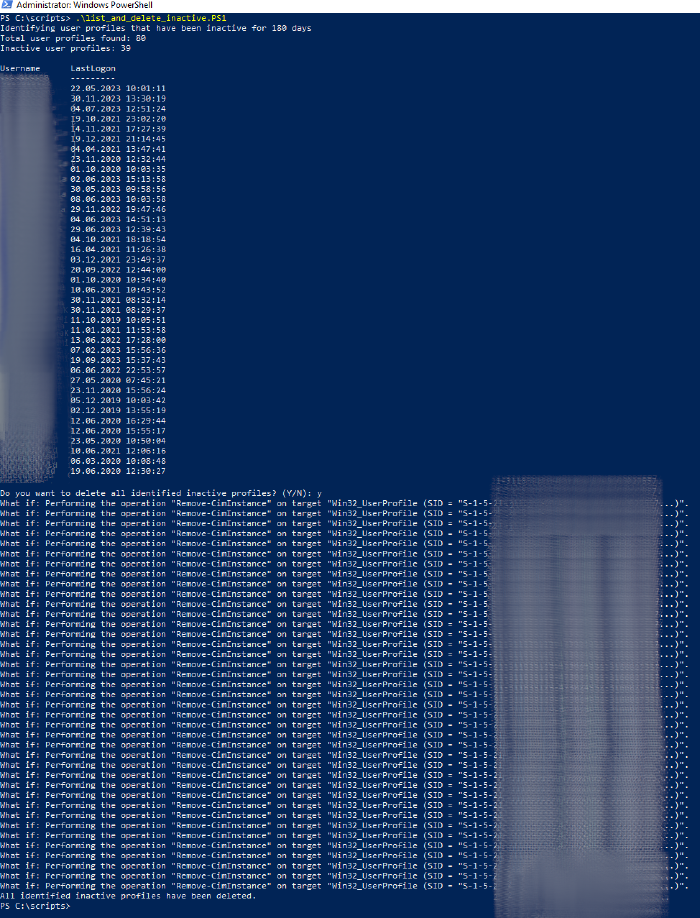 Listing domain users that haven’t logged in the computer for 180 days and removing their user profiles
Enable running scripts for the current user
Set-ExecutionPolicy -ExecutionPolicy Unrestricted -Scope CurrentUser
Update: Simply remove all the Windows domain user profiles that are not in the exclusion list
In this case there is no need to check and install the RSAT tools. Just like the above script, this one is set up with the dry run functionality (the “-WhatIf” argument).
# Excluded profiles
$ExcludedProfiles = "*Windows*", "*default*", "*Public*", "*Admin*", "tech"

try {
    # Get all User profile folders
    $UserProfiles = Get-ChildItem "C:\Users" | Where-Object {
        $excluded = $false
        foreach ($exclude in $ExcludedProfiles) {
            if ($_.Name -like $exclude) {
                $excluded = $true
                break
            }
        }
        -not $excluded
    }

    # Filter the list of folders to only include those that are not associated with local user accounts
    $NonLocalProfiles = $UserProfiles | Where-Object { $_.Name -notin $(Get-LocalUser).Name }

    # Initialize an empty array to store profiles to be removed
    $ProfilesToRemove = @()

    # Add profiles to be removed to the list
    foreach ($profile in $NonLocalProfiles) {
        $ProfilesToRemove += $profile.FullName
    }

    if ($ProfilesToRemove.Count -gt 0) {
        Write-Output "Profiles marked for deletion:"
        $ProfilesToRemove | ForEach-Object { Write-Output $_ }

        # Prompt to delete all identified profiles
        $confirmation = Read-Host "Do you want to delete all identified profiles? (Y/N)"
        if ($confirmation -eq "Y" -or $confirmation -eq "y") {
            foreach ($profilePath in $ProfilesToRemove) {
                try {
                    # Remove the profile
                    $profileToRemove = Get-CimInstance -Class Win32_UserProfile | Where-Object { $_.LocalPath -eq $profilePath }
                    $profileToRemove | Remove-CimInstance -ErrorAction Stop -WhatIf # Remove -WhatIf to perform actual user removal.
                } catch {
                    Write-Warning "Could not remove profile at ${profilePath}: $($_.Exception.Message)"
                }
            }
            Write-Output "All identified profiles have been processed."
        } else {
            Write-Output "No profiles were deleted."
        }
    } else {
        Write-Output "No profiles to be removed."
    }
} catch {
    Write-Error $_
}
Your thoughts?